
Skip to content
Talk to sales: 703-740-9749
 NEW RELEASE

Prep that thinks ahead.

SmartPrep turns your sales forecast into shift-ready plans, so your team knows exactly what to make, how much and when.

Build shift-specific preplists powered by your forecast

Print dissolvable labels with prep details and expiration tracking

Reduce waste and surprise 86's


$95 USD per location / month. Optional hardware bundles available.
See SmartPrep in Action
 
Prep Lists

Create and track performance on Prep Lists. Allow staff to see, scale, and complete recipes. Monitor quality and efficiency.

Predictive Prep

Bring Sales Forecast down to PMIX level and load into prep lists automatically. View and edit Prep predictions daily with full control.

Label Printing

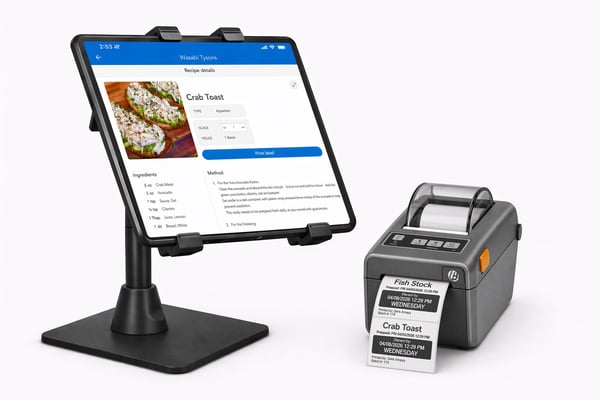
Print labels for completed prep using a fully integrated and supported printer. Monitor shelf-life and ensure food safety.

Checklists and Tasks

Create and track performance on opening/closing checklists, line checks and more. Give staff an easy interface to understand and complete tasks.

SmartPrep

How does SmartPrep know how much to prep?

Hint: you do not need to be PMIX mapped

Step 1

We learn how much you actually use

First, a heads up. For your first couple of prep cycles, you tell SmartPrep what you normally make. We don’t have your usage patterns yet, so there’s nothing to predict from. Once your team has counted and prepped a few times, SmartPrep takes over.

Here’s what it learns. Let’s follow one item: your house-made salsa.

Yesterday’s starting inventory
What your team counted before prep
3
Batches made yesterday
Logged when the prep task was finished
2
Today’s inventory count
What was left this morning
4
batches of salsa used

Nothing was used on this day, so there’s no usage to learn from yet. Lower today’s count to see how it works.
Step 2

We learn how much your kitchen uses

Yesterday’s sales
Straight from your POS
$15,000
Salsa used
1 batch
In sales
$15,000
=
Of salsa
1
batch

Step 3

We predict tomorrow’s prep

Yesterday $15,000 → 1 batch
TomorrowAI forecast $30,000 → 2 batches

MarginEdge’s AI automatically generates your forecast based on past sales data — factoring in seasonality, weather, holidays and trends — so you can plan with precision. It refreshes every day, and every time your team counts and preps, SmartPrep sharpens its picture of what your kitchen actually uses.

Every item

And it does this for every item on your list

Salsa was just one. Every prep item learns its own pattern from your counts, then gets its own number off the same forecast — every day, without anyone doing math.

Prep itemPrep tomorrow
SmartPrep_hardware@2x

HARDWARE BUNDLES

Get more out of SmartPrep

Hardware isn't required to use SmartPrep, but it makes the experience even better. Choose the setup that fits your kitchen — from a simple label printer to a full tablet station.

Available hardware:

Bluetooth label printer

Removable labels 

Tablet with stand


Starting at $450 USD per location. One-time fee. Shipping included.

FAQs

How does it know what we actually need to prep?

When you start, you tell SmartPrep what you’d normally prep on a given day — that’s the starting point. Then it learns from your actual usage. On top of that sits your AI sales forecast, so a projected $15K Saturday gets more prep than a projected $4K Tuesday.

Does it look at what we actually sell, or just overall sales?

It works from how much of each recipe your kitchen goes through per $1,000 in sales — not your PMIX. That means you don’t need your menu fully mapped for it to be accurate. It also catches what sales data never sees: staff meal, specials, comps, over-portioning.

Do I need a label printer or a tablet to get started?

No. SmartPrep works on devices you already have, and you can keep writing labels by hand. The printer is what turns prep into a record — expiration dates calculated automatically, and a QR code your team scans to add the batch back into on-hands.

Wait — it prints labels in one click?

With a printer connected, yes. Once prep is logged, labels print with prep time and expiration built in from the recipe’s shelf life. No more guessing on shelf life, and FIFO just... happens..

Can I see if my team actually did the prep?

Yes — who completed what, when, how long it took, and photos if you require them. Your prep team doesn’t need MarginEdge logins becasue we pull employee names from your labor data automatically. Otherwise you add first and last names under the labor tab.

What if my volume changes week to week?

It moves with you — day-of-week patterns, recent sales shifts, seasonality, weather. For a big private event, adjust that day’s forecast up and all your prep scales with it. If the party’s a set menu rather than your normal mix, bump those specific recipes instead.

Can it handle multiple locations?

Built for it. One prep list, scheduled across every store or just one — with different prep times per location. Pars calculate per location off each store’s own forecast, so you get one standard and local numbers. Running a commissary? Your prep list is the sum of what every unit ordered. And you can compare prep across stores, photos included. Admins at each location can adjust their own list.

Okay but how do I actually get set up?

Paste in the prep list you already have. SmartPrep matches it to your MarginEdge recipes and creates any that don’t exist yet. Add shelf lives and pars, set a schedule, done — plus an onboarding hub with videos and guided tours on every feature.

When will I be charged?

Prorated on the day you buy, then on your normal MarginEdge billing date — monthly or annual, with 10% off annual. Both billing contacts and admins can purchase it.